How to Report Technical Issues on MP Treasury IFMS Quickly!!
Facing technical issues on the MP Treasury IFMS Portalcan interrupt important tasks such as payslip access, bill processing, or payment tracking. Whether you are experiencing login errors, page loading problems, or transaction failures, knowing the correct way to report the issue is essential.
In this guide, we explain how to report technical issues on MP Treasury IFMS Portal, including where to submit complaints, what details to provide, and the best ways to get faster support and quick issue resolution.
What Is the MP Treasury IFMS Portal?
The Integrated Financial Management System (IFMS) is a digital platform used by the Madhya Pradesh Treasury to manage financial operations like employee payslips, challans, pension data, and more all in one online system. It’s part of the government’s move toward paperless, fast, and transparent financial services.
Whether you’re a government employee, DDO, accountant, or officer, you interact with IFMS for key tasks. But, like any online tool, it can have technical hiccups and knowing how to report them properly makes all the difference.
Common Technical Issues on MP Treasury IFMS Portal
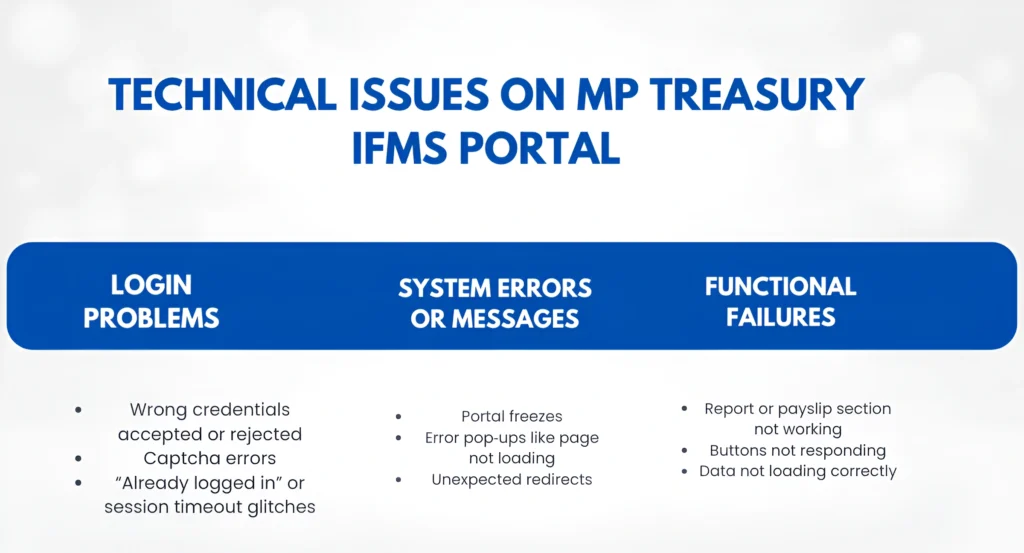
While using the MP Treasury IFMS Portal, users may face different technical problems that can stop them from completing important tasks. Understanding the exact issue helps you report it clearly and get faster support.
Login Problems
Users may face issues while signing in to the portal, such as incorrect username or password errors, captcha problems, session timeout, or “already logged in” messages.
Page Loading Errors
Sometimes the portal may not load properly. The page may freeze, show a blank screen, display an error message, or redirect unexpectedly.
Payslip, Report, or Data Issues
If the payslip section is not opening, reports are not downloading, bill details are missing, or data is not loading correctly, it should be reported as a technical issue.
Button or Form Submission Errors
In some cases, buttons may not respond, forms may fail to submit, or the system may show an error during submission. These issues can delay bill processing or other financial tasks.
Slow Speed or Timeout Issues
The portal may respond slowly, take too long to process requests, or show timeout errors during login, submission, or data loading.
Step-by-Step Guide to Report an Issue on MP Treasury IFMS
If you are facing any problem on the MP Treasury IFMS Portal, report it with complete details. A clear complaint helps the support team understand the issue quickly and provide the right solution.
Identify the Exact Problem
First, note what you were trying to do on the portal and what problem appeared. Do not write only “portal not working.” Instead, explain the exact issue.
For example:
“I logged in to the MP Treasury IFMS Portal to download my payslip, but the page showed ‘Error fetching data’ and the payslip did not open.”
You should mention:
Capture a Screenshot of the Error
If the portal shows an error message, blank page, or failed transaction screen, take a screenshot. This helps the technical team see the exact issue.
You can take screenshots using:
Attach the screenshot when sending your complaint by email or ticket.
Contact the Official IFMS Helpdesk
There are a few official ways you can report issues:
For urgent issues, you can contact the MP Treasury IFMS helpdesk directly.
Keep your employee code, user ID, department name, and issue details ready before calling.
Send an Email with Complete Details
If the issue is not urgent or you want to share screenshots, email is a better option.
Support Email: dta_director@mptreasury.gov.in
Use a clear subject line, such as:
Sample email:
Hello,
I am facing a technical issue on the MP Treasury IFMS Portal. I tried to download my payslip, but after login the page showed “Error fetching data.” The issue occurred on [date and time]. I have attached a screenshot for reference.
Please check and resolve the issue.
Use the Helpdesk Portal, If Available
If the MP Treasury IFMS dashboard provides an online helpdesk or ticket option, you can submit your issue there. A ticket system helps track your complaint and makes follow-up easier.
Follow Up Politely
If you do not receive a response within a reasonable time, follow up by phone or email. Mention your earlier complaint details so the support team can find your request easily.
Example:
“Hello, I submitted an IFMS technical issue on [date], but the problem is still not resolved. Kindly share an update.”
A polite follow-up can help speed up the resolution process.
Tips to Speed Up Bug Fixes
Here are quick tips that users love because they get faster help:
Be specific
“Payslip page not loading” is better than “Portal not working.”
Include date & time
When did it happen? This helps them check log
Attach screenshots
Visual context saves time.
Mention your device/browser
Chrome/Firefox, mobile/PC etc.
By doing these things, you make it easier for support teams to analyze and fix the problem — and you get back to work sooner!
What to Do While Waiting for a Fix
Sometimes issues can take time to resolve especially if it’s a server‑side bug. Here’s what you can do:
Try again later
Sometimes peak load or scheduled updates can cause temporary problems.
Clear cache & cookies
This can fix weird loading or display issues.
Try another browser
Chrome, Firefox, or Edge can behave differently.
Check with colleagues
If they’re facing the same issue, it’s likely a system‑wide problem (not just your device).
These simple tips can help resolve minor technical issues on MP Treasury IFMS quickly and improve your overall portal experience.
FAQs
Final Thoughts
Reporting issues on the MP Treasury IFMS Portal becomes much easier when you follow the right approach from the beginning. Instead of submitting a vague complaint, clearly explain the exact problem, mention the error message, and attach screenshots whenever possible. This helps the support team understand the issue faster and provide a quicker solution without unnecessary delays.
Using the official helpdesk, email support, or department contact details correctly can save a lot of time during issue resolution. If the problem is not fixed immediately, a polite follow-up with proper details often speeds up the process.
A well-reported complaint not only helps resolve your own technical issue faster but also supports improvements in the overall IFMS system experience for all users.