Latest MP Treasury Payslip Security Features Explained Guide
MP Treasury Payslip Security is crucial for safeguarding sensitive personal and financial data in today’s digital age. With more government employees relying on the MP Treasury Online Payslip System for accessing their salary information, ensuring the security of this platform has become a top priority.
In this guide, we’ll explore the latest security features implemented in the system, giving you a clear understanding of how your information is being protected. Stay informed and secure while accessing your payslips online!
Why Security Matters
Before we dive into features, let’s get one thing straight: the MP Treasury portal contains highly sensitive personal and financial data your salary, employee info, and sometimes bank details. If this data falls into the wrong hands, it can be used for identity theft, phishing scams, or fraud. So strong security isn’t optional it’s critical.
Government portals in India, including the MP Treasury system, are expected to follow strict security and cyber hygiene guidelines from national bodies like CERT-In. These guidelines push top‑level measures to prevent data breaches, phishing, and unauthorized access.
Key Security Features in MP Treasury Online Payslip
Here are the main protection layers designed to strengthen MP Treasury Payslip Security and protect sensitive payslip data.

Secure Login (Username + Password)
To access your payslip, you need valid login credentials a registered user ID and strong password. This basic authentication step ensures that only authorized employees can begin the login process. Most portals enforce rules like minimum password length and complexity to reduce risks.
Tip: Don’t use easy‑to‑guess passwords (like birthdays). Change your password regularly.
2. Captcha Verification
Before you even log in, the portal asks you to solve a captcha a small test that proves you’re human and not a bot. This stops automated programs from trying to guess passwords or flood the system with requests.
Why it matters: Bots can attack login pages nonstop. Captcha blocks most of them.
OTP (One‑Time Password) Verification
After entering your user ID and password, the system sends an OTP to your registered mobile number. You must enter this code to complete login.
Why this is strong: Even if someone steals your password, they can’t log in unless they have access to your phone.
Quick Tip: Never share your OTP with anyone not even IT support.
HTTPS Encryption
When you visit the portal, always make sure the web address begins with “https://” and shows a padlock icon in the browser.
That “s” stands for secure meaning the data you send and receive is encrypted using SSL/TLS. This stops hackers from capturing your login info during transmission.
This protects your data from being seen by others on public or shared Wi‑Fi.
Session Timeout and Auto‑Logout
If you log in and leave your computer idle for too long, the portal will automatically log you out. This limits the chance of someone else accessing your session if you step away.
Tip: Always manually log out when done.
Role‑Based Access Control
The system uses role‑based access, meaning each user sees only the information they’re allowed to see. For example, you can view your payslips, but not another employee’s.
Why this matters: It prevents data leakage and limits what attackers could access even with partial credentials.
Activity Logging and Monitoring
Modern government portals keep logs of user activity every login, every failed attempt, and every major action is recorded. This helps detect and investigate suspicious behavior.
If someone tries multiple wrong logins, admins can see it quickly.
Backend Security Standards
While not visible to users, the portal’s backend systems follow strict security guidelines. India’s government websites are expected to follow national cyber standards such as OWASP Top 10, secure coding practices, and regular audits before going live.
These standards protect against:
Extra Security Tips for Users
Your actions matter too. The portal has good defenses, but you should also:
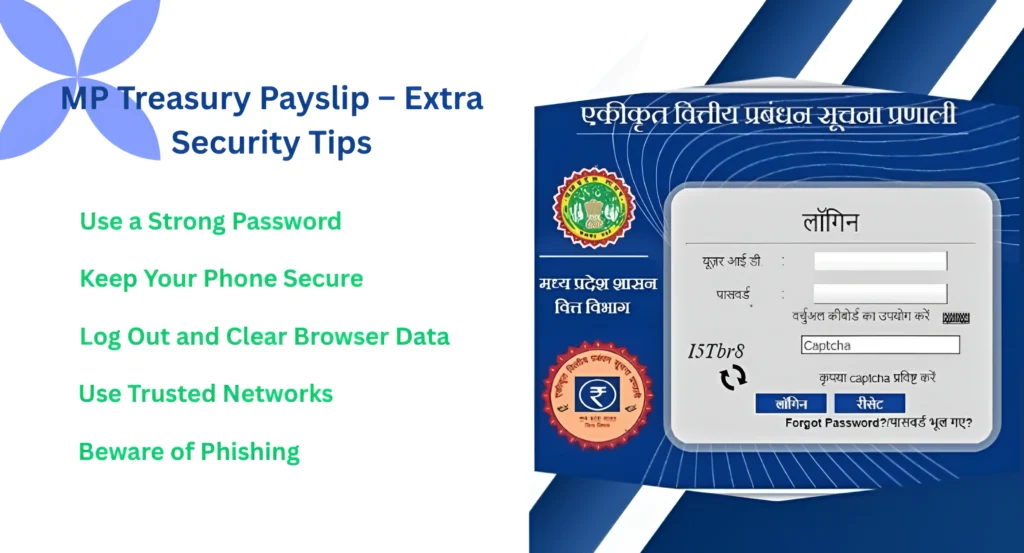
Use a Strong Password:
Choose a mix of letters, numbers, and symbols. Avoid repeating the same password everywhere.
Keep Your Phone Secure:
Since OTPs go to your phone, protect it with a lock screen and don’t share it.
Log Out and Clear Browser Data:
Especially on public devices log out and clear history.
Use Trusted Networks:
Try not to log in over public Wi‑Fi. If you must, use a VPN.
Beware of Phishing:
Never click suspicious links in emails that claim to be from the portal. Government sites won’t ask for your password or OTP through email or WhatsApp.
What Happens if Security Is Compromised?
In rare cases, user accounts can still face threats usually due to weak passwords or phishing. If you think your account was compromised:
The portal usually has a support contact for this it’s good to bookmark it.
Future Security Enhancements to Watch For
Security technology keeps evolving. Here are features becoming more common:
Beyond SMS OTP, future systems might use authentication apps or biometrics (like fingerprints). MFA makes accounts even harder to break.
AI and machine learning may soon help detect suspicious login patterns instantly.
This means never automatically trust any access, and verify every login step.
MP Treasury Login Safety Checklist Before Viewing Payslip
Before opening your MP Treasury payslip, follow this quick safety checklist:
Common MP Treasury Security Problems and Smart Solutions
| Problem | Why It Happens | Smart Solution |
|---|---|---|
| OTP not received | Mobile number inactive or network issue | Check network and update your number through the department. |
| Wrong password error | Password entered incorrectly or forgotten | Use the forgot password option and reset it safely. |
| Portal not opening safely | Fake link or browser warning | Close the page and search only the official portal. |
| Account locked | Too many failed login attempts | Wait or contact the department/helpdesk. |
| Suspicious login activity | Password may be shared or exposed | Change password immediately and inform HR/accounts. |
How to Identify a Fake MP Treasury Payslip Link
Be careful if someone sends you a payslip link on WhatsApp, SMS, or email.
Check these signs before clicking:
Never enter your login details on any suspicious page.
What Employees Should Do After Downloading Payslip
After downloading your MP Treasury payslip, keep your data safe.
FAQs
Final Thoughts
The MP Treasury Online Payslip System uses multiple layers of defense to protect your information strong logins, captcha, OTP, encryption, auto logout, role access, and more. These features work together to keep your salary data safe from unauthorized access, bots, and common web threats.
Follow good security habits yourself strong passwords, careful device use, and awareness of phishing and you’ll be well protected. The system and your habits together form a solid shield.