How Far Back Can You Get MP Treasury old payslips? Guide
MP Treasury old payslips are essential for government employees who need to access past salary records for loans, income verification, or official documentation. The MP Treasury portal provides a convenient way to download monthly salary slips online, but many employees often wonder how far back they can retrieve these records.
In this guide, we explain the availability of historical payslips, how to download them, and what steps to take if you need records older than what the portal shows.
How the MP Treasury Payslip System Works
MP Treasury, through the IFMS (Integrated Financial Management System), allows government employees in Madhya Pradesh to log in and access their payslips. To access your payslips:
So, essentially, you can choose the month and year and retrieve any payslip that exists in the system.
Can You Get a Payslip from 5 Years Ago?
Yes, in most cases, you can access payslips from 5 years ago if they’re still available in the system. Since the system lets you pick any month and year when generating your payslips, the data for the past years is generally preserved. There’s no official “expiry date” for data on the portal, so as long as the payslip data exists in the system, it should be accessible.
What to Do If You Can’t Find a Payslip from 5 Years Ago
If you try selecting a month and year from five years ago and can’t find your payslip, here are a few things to do:
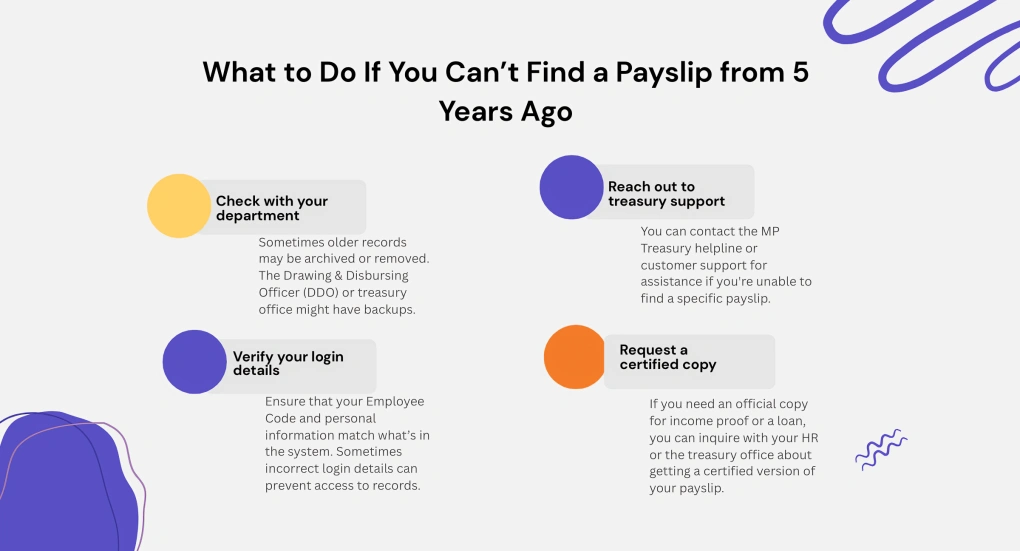
Sometimes older records may be archived or removed. The Drawing & Disbursing Officer (DDO) or treasury office might have backups.
You can contact the MP Treasury helpline or customer support for assistance if you’re unable to find a specific payslip.
Ensure that your Employee Code and personal information match what’s in the system. Sometimes incorrect login details can prevent access to records.
If you need an official copy for income proof or a loan, you can inquire with your HR or the treasury office about getting a certified version of your payslip.
Tips for Easy Access to Payslips
What Actually Decides How Many Years You Can View?
Payslip availability depends on when your department’s records were added to IFMS and whether older data has been archived. The year selector alone does not guarantee that every historical slip is available. Check several months from the required year before assuming the entire record is missing. Your DDO can confirm whether older payroll data exists elsewhere.
Transferred or Retired? Your Old Payslips May Be Elsewhere
A transfer, retirement, changed DDO, or updated employee code can affect how previous payslips appear. Check whether the old record is linked to your former office or employee profile. Contact the previous DDO with your employee code, service period, and required months. Retired employees may also request records from the pension or establishment section.
Payslip Listed but PDF Will Not Download?
Allow pop-ups, try another supported browser, and clear expired login sessions before generating the slip again. Confirm that a PDF reader is available and the browser is not blocking downloads. If the file appears blank, sign in again and select the month manually. Save a screenshot of any error before contacting technical support.
Need Income Proof When the Old Slip Is Unavailable?
Ask your department for a salary certificate, annual salary statement, or certified payroll extract. A bank statement or Form 16 may also support income verification, depending on the requesting organization. Confirm which alternative document the bank or authority accepts before applying. Keep the written request and acknowledgement for follow-up.
Old MP Treasury Payslip Missing? Find the Exact Problem and Fix
| Common problem | Possible reason | Best solution |
|---|---|---|
| Required year is not displayed | Older records may be archived or unavailable online | Request the payslip from your DDO, establishment section, or Treasury Office. |
| Only some months are missing | Salary may not have been processed under the current DDO for those months | Check the payment period and contact the office that prepared the original salary bill. |
| Old employee code shows no records | Your code may have changed after a transfer or profile update | Provide both old and new employee codes when requesting historical records. |
| Payslip appears but will not download | Browser settings, pop-up blocking, or an expired session may be responsible | Sign in again, allow downloads, and try another supported browser or device. |
| Downloaded PDF is blank or damaged | The document may not have generated correctly | Generate it again and save an error screenshot if the issue continues. |
| Portal access is unavailable after retirement | Employee self-service access may have changed | Contact the former DDO, pension section, or establishment office for a copy. |
| Online slip is not accepted officially | The receiving authority may require verification | Request a signed or certified salary statement from the concerned department. |
| Payslip is urgently needed for a loan | Retrieving archived records may take time | Ask the lender whether a salary certificate, Form 16, or bank statement is acceptable temporarily. |
FAQs
Final Thoughts
The MP Treasury IFMS portal is designed to give you easy access to your payslips, whether current or from several years ago. While you should be able to retrieve a payslip from 5 years ago, there are cases where older records may not be available. In such cases, don’t hesitate to reach out to your department or the treasury office for assistance.
By keeping regular backups of your payslips, you can avoid future access issues and ensure you always have the documentation you need.