MP Treasury Salary After Transfer: Fix DDO Mapping and Delay
After a government employee gets transferred in Madhya Pradesh, one of the most common concerns is MP Treasury Salary After Transfer and why it gets delayed. Many employees find that their salary is not credited on time, the pay slip is not visible, or the salary bill is stuck in the treasury system.
In most cases, the issue is not with the salary itself. The delay usually happens because of DDO mapping problems, incomplete transfer updates, IFMS record issues, or pending approvals.
Understanding how the transfer salary process works can help employees quickly identify the reason behind the delay and fix it.
This guide explains the reasons behind MP Treasury Salary After Transfer delay, how to correct DDO mapping, what steps employees should follow, and how to check salary status.
Why Does MP Treasury Salary After Transfer Get Delayed?
When an employee is transferred from one department, office, or location to another, their salary processing must also move to the new Drawing and Disbursing Officer (DDO).
Until the employee record is correctly linked with the new DDO, the salary bill may not be processed.
Many employees search for solutions when their MP Treasury Salary After Transfer is pending, but the main reason is usually a missing update in the employee system.
Common Reasons for Salary Delay After Transfer
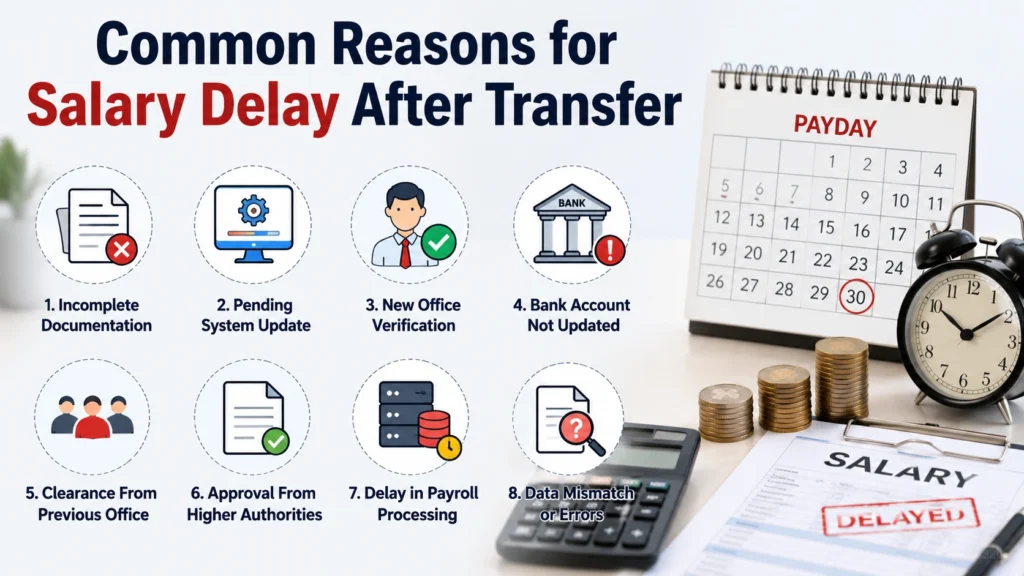
| Problem | How It Affects Salary |
|---|---|
| DDO mapping not updated | New office cannot prepare salary bill |
| Employee transfer not updated in IFMS | Old office and new office records do not match |
| Pending department approval | Salary bill remains pending |
| Incorrect employee details | System may reject salary processing |
| Bank details mismatch | Payment may fail |
| Last Pay Certificate (LPC) pending | New office cannot complete salary preparation |
The MP Treasury IFMS system connects employee records, DDO details, salary bills, and treasury approvals digitally. Any mismatch between these records can stop salary processing.
What Is DDO Mapping in MP Treasury?
DDO stands for Drawing and Disbursing Officer. A DDO is the authorized officer responsible for preparing and submitting salary bills for employees working under a particular office.
Drawing and Disbursing Officer
The officer authorized to prepare and submit salary bills for employees under their office.
DDO Mapping
Linking an employee’s service record with the correct office and DDO in the IFMS system.
After Transfer
Your old DDO may no longer be responsible for your salary. Your profile must be connected with the new DDO.
Example
Before TransferAfter Transfer
If this connection is missing, the salary process may stop. The employee’s record must be re-mapped to the new office and DDO before bills can be processed at the treasury.
What Happens to Salary After Transfer in MP Government Jobs?
After receiving a transfer order, the salary process usually follows these steps:
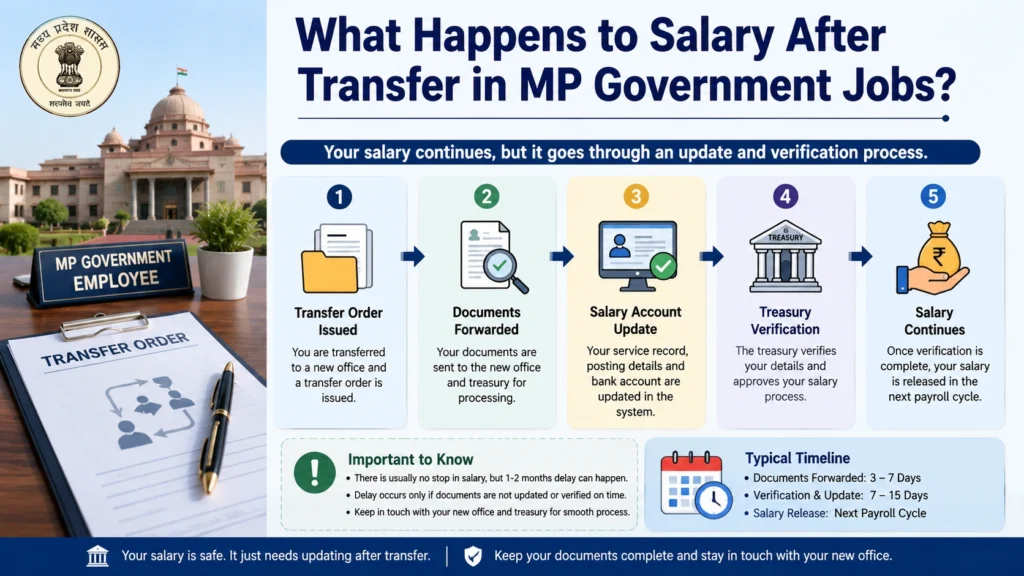
If any step is incomplete, salary may be delayed.
Main Reasons for MP Treasury Salary Delay After Transfer
DDO Mapping Is Not Updated
This is the most common reason behind MP Treasury Salary After Transfer problems.
Your physical transfer may be completed, but your IFMS profile may still show your previous office or old DDO.
Ask your new DDO office to:
- Check your employee mapping
- Update office details
- Link your employee code with the new DDO
- Complete pending approvals
Employee Transfer Details Are Not Updated in IFMS
Sometimes the department completes the transfer order, but system records are not updated immediately.
Because salary depends on digital records, the system may not allow the new office to generate your salary bill.
Contact:
- New office establishment section
- DDO operator
- Department payroll section
Request verification of your transfer entry.
Last Pay Certificate (LPC) Is Not Received
When an employee moves from one office to another, the previous office may need to provide salary-related information.
This includes:
- Current pay details
- Allowances
- Deductions
- Recovery information
Without proper transfer documents, salary preparation may stop.
Employee Details Mismatch
Small mistakes can create big delays.
Check details such as:
- Employee code
- Name spelling
- Bank account number
- IFSC code
- Designation
- Department details
- Joining date
Incorrect employee information may prevent salary processing.
How to Fix DDO Mapping After Transfer in MP Treasury?
Follow these steps to resolve your MP Treasury Salary After Transfer delay:
Step 1: Contact Your New Office DDO
The first person to contact is your new Drawing and Disbursing Officer.
Explain that your salary is delayed because of transfer-related mapping issues.
Provide:
- Transfer order
- Joining report
- Employee ID/code
- Previous office details
Step 2: Verify Employee Mapping in IFMS
The DDO should check:
- Employee profile
- Office mapping
- Treasury details
- Department linkage
If the old DDO is still mapped, correction is required.
Step 3: Update Transfer Details
The concerned office updates your transfer information in the system.
This may include:
- New office code
- New DDO code
- Posting details
- Service record information
Step 4: Complete Approval Process
Some changes require approval from authorized officials before becoming active.
Wait until the updated mapping reflects in the system.
Step 5: Generate Salary Bill Again
After successful mapping:
- DDO prepares the salary bill
- Treasury verifies it
- Payment is processed
How to Check MP Treasury Salary Status After Transfer?
Employees facing MP Treasury Salary After Transfer pending issues should check their salary progress and confirm whether the bill has moved forward.
Generally, salary moves through these stages:
| Status | Meaning |
|---|---|
| Bill Created | DDO has prepared salary bill |
| Pending Approval | Approval is still required |
| Sent to Treasury | Treasury verification is in process |
| Payment Released | Payment sent to bank |
| Credited | Salary received in account |
If the status remains unchanged for several days, contact your DDO or accounts section.
MP Treasury Salary Not Showing After Transfer: Quick Fixes
If your MP Treasury Salary After Transfer details are not showing, try these quick solutions to resolve the issue and check your updated salary information.
Check Employee Profile
Confirm:
- Employee code is correct
- New office is updated
- DDO details are correct
Contact New DDO
Ask:
- Has my mapping been completed?
- Has my salary bill been generated?
- Is any approval pending?
Verify Bank Information
Check:
- Account number
- IFSC code
- Bank account status
Check Previous Office Clearance
Make sure:
- LPC is issued
- Previous salary records are transferred
- Pending recoveries are updated
Documents Required for Fixing Salary Delay After Transfer
Keep these documents ready:
Having these documents ready can reduce unnecessary delays.
How Many Days Does Salary Take After Transfer?
There is no fixed number of days because it depends on:
If all records are updated correctly, salary processing normally becomes regular from the next salary cycle.
Common MP Treasury Salary Problems and Solutions
| Issue | Possible Reason | Solution |
|---|---|---|
| Salary not credited after transfer | DDO mapping pending | Contact new DDO |
| Pay slip not available | Salary bill not generated | Check bill status |
| Salary showing pending | Approval incomplete | Follow up with accounts section |
| Payment released but not received | Bank delay | Contact bank |
| Wrong salary amount | Deduction or record issue | Check pay slip |
Expert Tips to Avoid Salary Delay After Transfer
Complete Joining Formalities Quickly
Do not delay submitting your joining report after transfer.
Stay Connected With Your DDO
Your DDO handles the salary process, so regular follow-up helps.
Check IFMS Details Early
Do not wait until salary day to discover mapping problems.
Keep Digital Copies
Save copies of:
- Transfer orders
- Salary slips
- Service documents
Verify Bank Details
Even a small bank detail error can delay payment.
Latest posts
- MP IFMS Annual Increment Missing? Fix Salary Errors in 2026!
- MP Treasury Challan Online: Pay, Status & Receipt Download
- MP Treasury Salary After Transfer: Fix DDO Mapping and Delay
- MP IFMS Medical Reimbursement Claim: Check Status, Process, Errors & Complete Guide
- MP IFMS NPS Contribution Missing: Check PRAN Credit Details?
Frequently Asked Questions
Final Thoughts
MP Treasury salary delay after transfer is usually caused by a missing system update rather than a problem with salary itself. The most important step is to ensure that your employee record is correctly mapped with the new DDO in IFMS.
If your salary is delayed, do not wait for multiple salary cycles. Contact your new DDO, verify your mapping status, complete pending transfer formalities, and keep your documents ready.
A correctly updated DDO mapping helps your salary process continue smoothly every month.