MP IFMS Annual Increment Missing? Fix Salary Errors in 2026!
Government employees in Madhya Pradesh depend on the MP IFMS portal and MP Treasury system to manage salary records, pay details, service information, and annual increments. However, many employees face issues where their MP IFMS annual increment is missing, not updated, or not reflected in their salary statement.
A missing annual increment in the MP Treasury records can affect monthly salary, arrears calculation, pay fixation, and future benefits such as pension and retirement payments. This issue usually occurs because of incorrect service data, pending approval, incomplete employee records, or technical problems in the IFMS system.
This guide explains why the MP IFMS increment is not showing, how to check your salary record, how to correct missing increment details, and what steps employees should follow to resolve the issue.
What Is MP IFMS Annual Increment?
The MP IFMS annual increment is a yearly salary increase provided to eligible government employees of Madhya Pradesh according to government service rules. It is added to the employee’s basic pay after completing the required service period and meeting eligibility conditions.
The increment update is processed through the MP IFMS system, which maintains employee salary and payroll records.
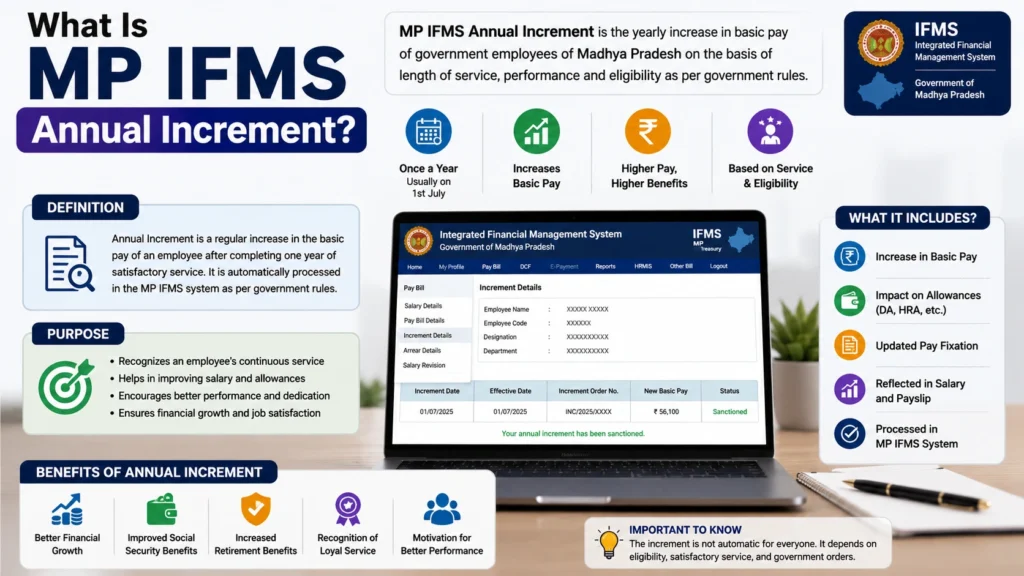
An annual increment affects:
If the increment is not updated in MP IFMS, the employee may receive a lower salary than expected.
Why Is MP IFMS Annual Increment Missing?
There are several reasons why an employee’s annual increment may not appear in the MP IFMS salary record.
Increment Approval Is Pending
One of the most common reasons is that the annual increment has been entered but is waiting for approval from the concerned authority.
The process generally involves:
- Employee record update
- Office verification
- Competent authority approval
- IFMS salary update
If approval is pending, the increment will not appear in the salary slip.
Service Record Information Is Incorrect
The IFMS system calculates increments based on employee service details. Errors in the following information can stop increment processing:
Even a small mistake in service data can affect salary calculation.
Annual Increment Date Is Incorrect
Every government employee has a specific increment date based on applicable service rules. If the increment date entered in IFMS is incorrect, the system may not generate the expected salary increase.
Employees should verify:
| Record Detail | Should Be Checked |
|---|---|
| Employee ID | Correct |
| Date of Joining | Accurate |
| Increment Date | Updated |
| Pay Level | Correct |
| Basic Pay | Matching service records |
Employee Details Are Not Updated After Transfer
Government employees frequently change departments, offices, or locations. During transfer, employee information may not sync correctly between departments.
Common transfer-related issues include:
Technical Error in MP IFMS Portal
Sometimes the problem is not related to employee records but due to system issues.
Examples:
In such cases, employees need assistance from their department’s IFMS operator.
How to Check MP IFMS Annual Increment Status
Before submitting a complaint, employees should verify whether the increment is actually missing.
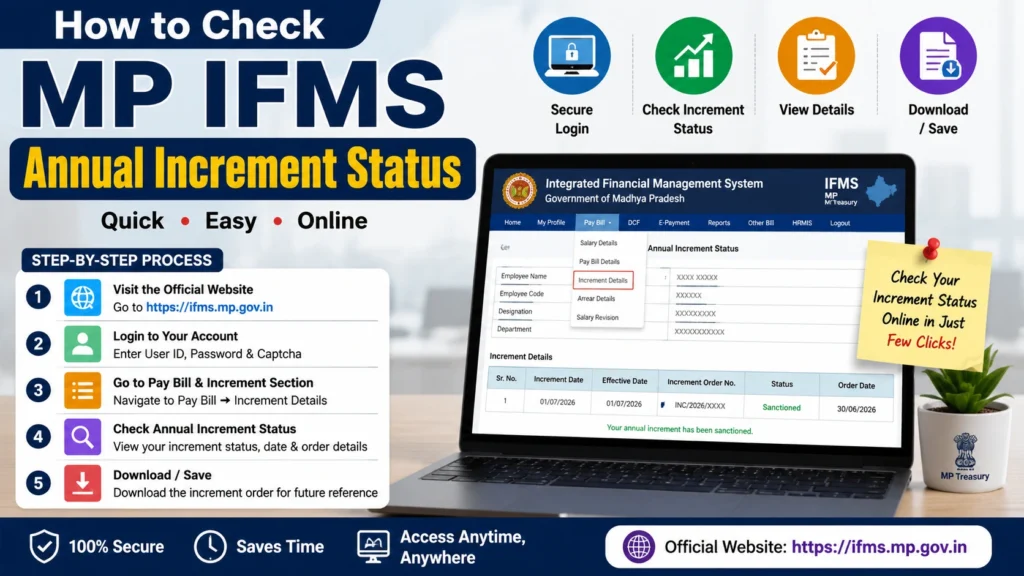
Follow these steps:
Step 1: Login to MP IFMS Portal
Visit the official MP IFMS website and log in using your employee credentials.
Check your:
Step 2: Check Salary Slip
Download your latest salary slip and compare it with the previous month.
Look for:
If your basic pay remains unchanged after the expected increment date, further correction may be required.
Step 3: Verify Employee Profile Details
Check whether these details are correct:
Incorrect information should be reported to the office administration section.
MP IFMS Annual Increment Missing: Step-by-Step Solution
If your increment is missing in MP IFMS, follow these steps.
Contact Your Drawing and Disbursing Officer (DDO)
The first point of contact should be your department DDO.
The DDO handles:
- Employee salary records
- Increment approval
- Payroll processing
- IFMS corrections
Explain the issue and provide supporting documents.
Submit an Increment Correction Request
Prepare a written application mentioning:
- Employee name
- Employee code
- Department name
- Current designation
- Missing increment date
- Salary details
- Request for correction
Attach:
- Previous salary slip
- Service book details
- Increment order, if available
- Employee ID proof
Office Verification
The concerned department will verify:
- Service eligibility
- Increment due date
- Pay fixation details
- Previous records
After verification, the correction request can be forwarded for approval.
Update in MP IFMS
After approval, the IFMS operator updates the increment details.
The revised salary should appear after the next payroll processing cycle.
Documents Required for MP IFMS Increment Correction
Keep the following documents ready:
| Document | Purpose |
|---|---|
| Employee ID | Employee verification |
| Previous salary slip | Salary comparison |
| Service book copy | Service verification |
| Increment order | Proof of approval |
| Joining order | Service calculation |
| Transfer order, if applicable | Record update |
MP IFMS Increment Missing vs Salary Not Increased
Many employees confuse these two issues.
| Issue | Possible Reason | Solution |
|---|---|---|
| Increment not showing in IFMS | Data not updated | Request IFMS correction |
| Increment approved but salary unchanged | Payroll issue | Contact DDO |
| Salary slip shows old pay | Processing delay | Check the next payroll cycle |
| Wrong basic pay | Pay fixation error | Submit correction request |
Common Mistakes Employees Make During Increment Correction
Avoid these mistakes:
Waiting Too Long
A delayed increment correction can affect future salary calculations and arrears.
Report the issue as soon as possible.
Submitting Incomplete Documents
Missing service records or salary slips can delay verification.
Always attach complete supporting documents.
Contacting the Wrong Department
Many employees directly approach higher offices without first contacting their DDO.
The DDO is usually responsible for initial correction.
Not Checking Service Records
Sometimes the problem is caused by incorrect employee data.
Always verify your service details before requesting correction.
How Long Does MP IFMS Increment Correction Take?
The time required to correct a missing increment depends on the nature of the issue and the approval process followed by the concerned department.
A simple data-entry mistake may be corrected quickly after verification. However, cases involving an incorrect service book, transfer records, pay fixation, or pending approval may require more time.
The correction process may involve:
There is no single fixed timeline for every case. Employees should keep a copy of the submitted application and follow up with the DDO or concerned office section if the correction remains pending.
Will Employees Receive Arrears After Increment Correction?
If an eligible annual increment was not added on time, the employee may be entitled to receive the salary difference for the affected period, subject to departmental verification and applicable government rules.
The arrears amount may include:
The arrears may be paid with the revised salary or processed separately. The exact amount depends on the corrected increment date, pay level, basic pay, and the number of affected months.
Employees should check the revised salary statement and arrears calculation carefully after the correction is completed.
When Should an Employee Escalate the Complaint?
Employees should first report the missing increment to the DDO, establishment section, or office IFMS operator.
The matter may need to be escalated when:
Before escalating the complaint, keep copies of:
The complaint should be submitted through the official departmental channel. Employees should avoid sharing passwords, OTPs, or sensitive IFMS login information with unauthorized persons.
Latest posts
- MP IFMS Annual Increment Missing? Fix Salary Errors in 2026!
- MP Treasury Challan Online: Pay, Status & Receipt Download
- MP Treasury Salary After Transfer: Fix DDO Mapping and Delay
- MP IFMS Medical Reimbursement Claim: Check Status, Process, Errors & Complete Guide
- MP IFMS NPS Contribution Missing: Check PRAN Credit Details?
Frequently Asked Questions
Final Thoughts
A missing MP IFMS annual increment should not be ignored because it can affect basic salary, allowances, arrears, future pay fixation, pension, and retirement benefits.
Employees should first compare their salary slips, verify their employee profile and service records, and check whether the increment approval is pending. If an error is found, they should submit a written correction request to the DDO with all relevant documents.
Most increment issues can be resolved through proper service record verification, departmental approval, and an authorized update in the
MP IFMS system. Employees should maintain copies of all applications and supporting documents until the revised salary and arrears are correctly reflected.
Since procedures and service rules may vary by department and employee category, employees should rely on official departmental instructions and authorized MP IFMS officials for the final correction.