MP Treasury Challan Status: Track Tax Payments Online Guide
MP Treasury Challan Status tracking is an essential part of managing your tax payments. Paying taxes is a responsibility that all taxpayers must fulfill, but keeping track of those payments can often feel like a hassle. Fortunately, the MP Treasury Portal has made it easier than ever to monitor your tax payments and check the status of your challans online. Whether you’ve paid your taxes recently or are looking to verify previous payments, this guide will show you how to track your MP Treasury Challan Status quickly and easily.
With just a few clicks, you can get real-time updates on your payment status, ensuring that everything is in order and up-to-date. Let’s dive into how you can make the most of this online tool and keep your tax records in check without any stress.
What Is the MP Treasury Portal?
The MP Treasury Portal is the official website of the Government of Madhya Pradesh that lets you:
It’s designed to make tax payments transparent and easy so you don’t have to visit a government office for simple tasks.
What You Need Before You Start
Before you log in or check status, keep these handy:
If you don’t have CIN or CRN, don’t worry there’s a way to search using other details (explained later).
How to Go to the Right Portal
This is the official source for treasury services like challan status and payment tracking. Always be sure you’re on this .gov.in domain to stay safe.
How to Track Your Tax Payment Status
There are two main ways to check your payment status:
If You Have Your CIN / CRN
This is the easiest way.
You’ll see the status of your payment: whether it’s pending, processed, or completed.
Tip: Save your CIN and payment receipt right after you make a tax payment you’ll need it later.
If You Don’t Have CIN / CRN
If you didn’t save your CIN or CRN, you can still search your challan:
If the portal finds your challan, it will show you all related details including status.
Step‑by‑Step: Using Cyber Treasury
For many departments, the challan and payment system is under Cyber Treasury on the MP Treasury Portal. Here’s how to use it:
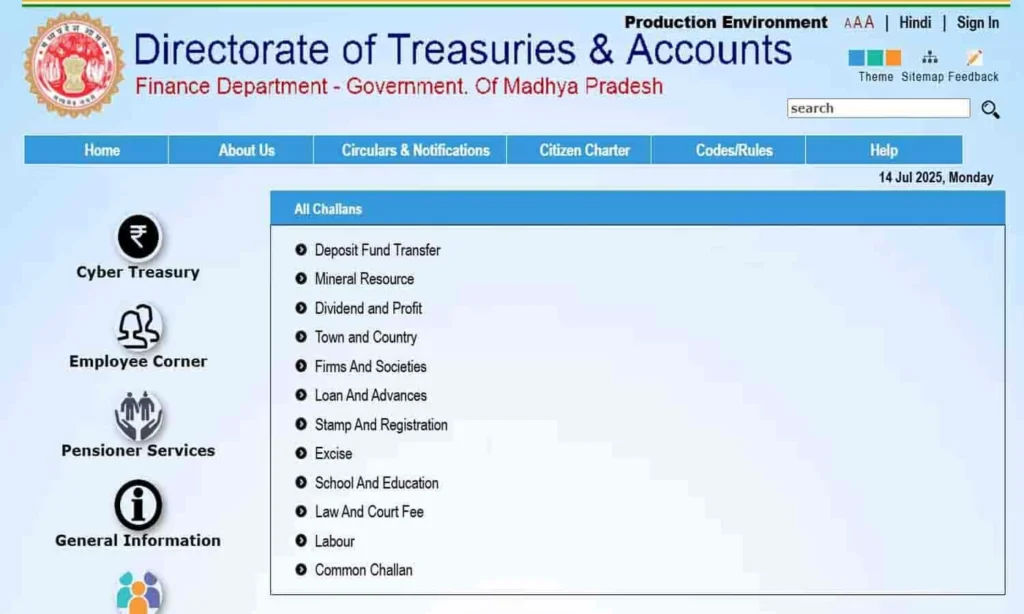
You’ll see:
How to Print or Save Your Challan
Check Your MP Treasury Challan Status Easily:
Keeping a copy is useful for records and tax filing later.
Common Problems and Solutions
Problem: You entered your CIN but nothing shows up.
Problem: The site is loading slowly.
Problem: You don’t have your CIN/CRN.
Problem: You can’t log in as a registered user.
Benefits of Tracking Your Status Online
Why bother checking online? Because it:
This transparency is exactly why the MP Treasury Portal exists in the first place.
Quick Tips to Make It Easier
Best Time to Check MP Treasury Challan Status
| Situation | What You Should Do |
|---|---|
| Just paid online | Wait for a few hours before checking |
| Status not updated | Check again after 24 hours |
| Money deducted but no status | Save bank transaction ID |
| No update after 48 hours | Contact bank or treasury support |
This helps users avoid duplicate payments and unnecessary confusion.
What Does “Pending” Status Mean?
If your MP Treasury Challan Status shows Pending, it means your payment is still being verified by the system. In some cases, the amount may be deducted from your bank account, but the confirmation may not yet be updated on the MP Treasury Portal.
| Pending Status Situation | What It Means | What You Should Do |
|---|---|---|
| Amount deducted from bank | Payment started successfully | Check your bank statement |
| Portal still shows Pending | Treasury confirmation may be delayed | Wait for some time before checking again |
| No update after 24–48 hours | Payment may not be synced yet | Save your transaction reference number |
| Status remains Pending for more than 48 hours | Manual support may be needed | Contact the concerned department or treasury support |
How to Confirm a Successful Challan Payment
Follow these signs to confirm your payment:
- Status shows Success, Paid, or Completed.
- Challan number is visible on the portal.
- Payment date and amount are correct.
- Department name matches your payment purpose.
- Receipt download or print option is available.
If all details match, your challan payment is successfully recorded.
Money Deducted but Challan Status Not Updated
| Possible Reason | Best Action |
|---|---|
| Bank confirmation delay | Wait and check again later |
| Portal server issue | Try after some time |
| Wrong CIN/CRN entered | Recheck the number carefully |
| Payment not synced | Contact support with transaction ID |
Avoid paying again until you confirm the original transaction status.
Why Saving Your MP Treasury Receipt Is Important
Keeping a saved receipt helps you avoid problems if payment proof is required later.
- Your MP Treasury receipt works as official proof of payment.
- It can be useful for tax filing, refund requests, department verification, or future record checks.
- Always download the receipt once your challan status shows Successful, Paid, or Completed.
- Save the receipt on your phone, computer, email, or cloud storage.
- Rename the file clearly with the payment date, challan number, or department name.
How to Check MP Treasury Challan Status on Mobile
- Open the official MP Treasury Portal on your mobile browser.
- Go to Challan Search or Payment Status.
- Enter your CIN, CRN, URN, or required personal details.
- Tap Search or Submit.
- View your payment status and download the receipt.
If the page does not load properly, use desktop mode in your browser.
Common Mistakes to Avoid
| Mistake | Why It Causes Problems |
|---|---|
| Entering wrong CIN/CRN | Challan record will not appear |
| Using unofficial websites | Risk of wrong or unsafe information |
| Selecting wrong department | Payment details may not match |
| Not saving receipt | No easy proof for future use |
| Paying again too soon | May cause duplicate payment issues |
FAQs
Final Thoughts
Tracking your tax payments on the MP Treasury Portal is a simple and effective way to stay organized and ensure everything is in order. Whether you want to check your payment status, download receipts, or review your tax history, the portal gives you full control in one place.
To get started, visit the official MP Treasury Portal at mptreasury.gov.in and use the Challan Search or Payment Status option. Enter the correct CIN/CRN number or your personal details to quickly view, verify, or download your payment status without any hassle.