MP IFMS Medical Reimbursement Claim: Status & Process Guide
Have you submitted a medical reimbursement claim through MP IFMS and want to check whether it is approved, pending, or facing any issue? Many Madhya Pradesh government employees look for simple ways to track their claims, understand errors, and know when their payment will be processed.
The MP Treasury system plays an important role in managing government financial transactions, including employee-related payments and reimbursement processes. Through the MP IFMS (Integrated Financial Management Information System) portal, eligible employees can submit medical reimbursement claims, check application updates, and track payment status online.
In this complete guide, you will learn how to check MP IFMS Medical Reimbursement Claim status, understand different claim stages, fix common errors, check payment updates, prepare required documents, and avoid reasons that may delay approval.
Whether your claim status shows pending, returned, rejected, approved, or payment processed, this article will help you understand the complete process and take the right steps for faster reimbursement.
What is MP IFMS Medical Reimbursement Claim?
MP IFMS Medical Reimbursement Claim is an online service provided by the Madhya Pradesh government for employees to submit requests for reimbursement of medical expenses.
When a government employee or eligible family member receives medical treatment, they can apply for reimbursement by submitting medical bills and required documents through the IFMS system.
The submitted claim goes through verification and approval stages before the reimbursement amount is released.
Benefits of MP IFMS Medical Reimbursement System
The online IFMS system provides several benefits to government employees:
How to Check MP IFMS Medical Reimbursement Claim Status Online?
Employees can check their medical reimbursement claim status by following these steps:
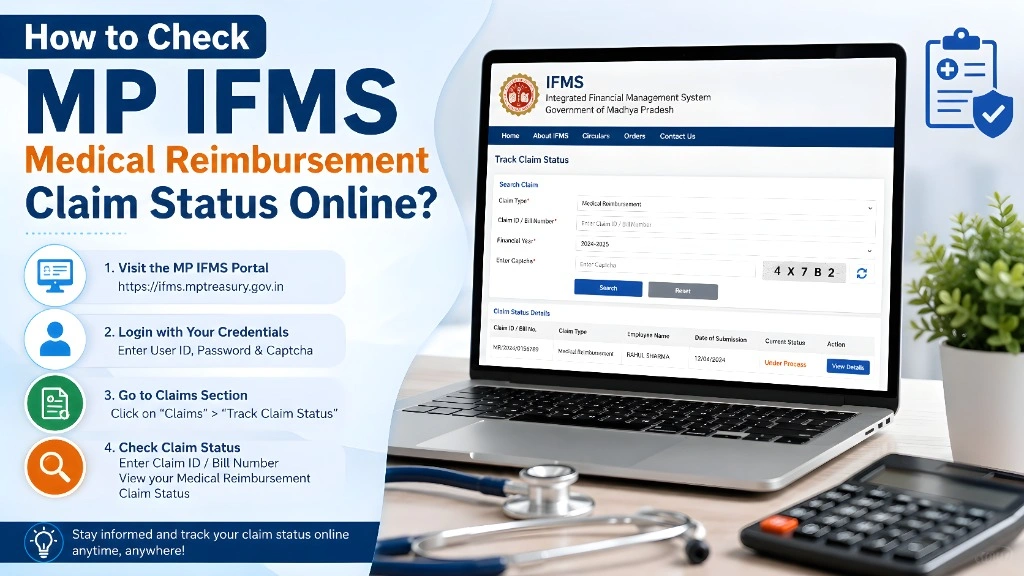
Step 1: Visit MP IFMS Portal
Open the official MP IFMS website and access the employee login section.
Step 2: Login to Your Account
Enter your:
After successful login, you will reach your employee dashboard.
Step 3: Open Medical Reimbursement Section
Find the option related to:
Medical Reimbursement Claim / Employee Claims
Step 4: Check Your Claim Status
Select your submitted claim to view the latest update.
The status may appear as:
MP IFMS Medical Reimbursement Claim Status Meaning
Understanding claim status helps employees know what action is required.
| Claim Status | Meaning |
|---|---|
| Submitted | Claim has been successfully submitted |
| Pending Verification | Documents are being checked |
| Approved | Claim has been accepted |
| Returned | Correction is required |
| Rejected | Claim has been declined |
| Paid | Amount has been transferred |
MP IFMS Medical Reimbursement Claim Process
The complete reimbursement process generally includes the following steps:
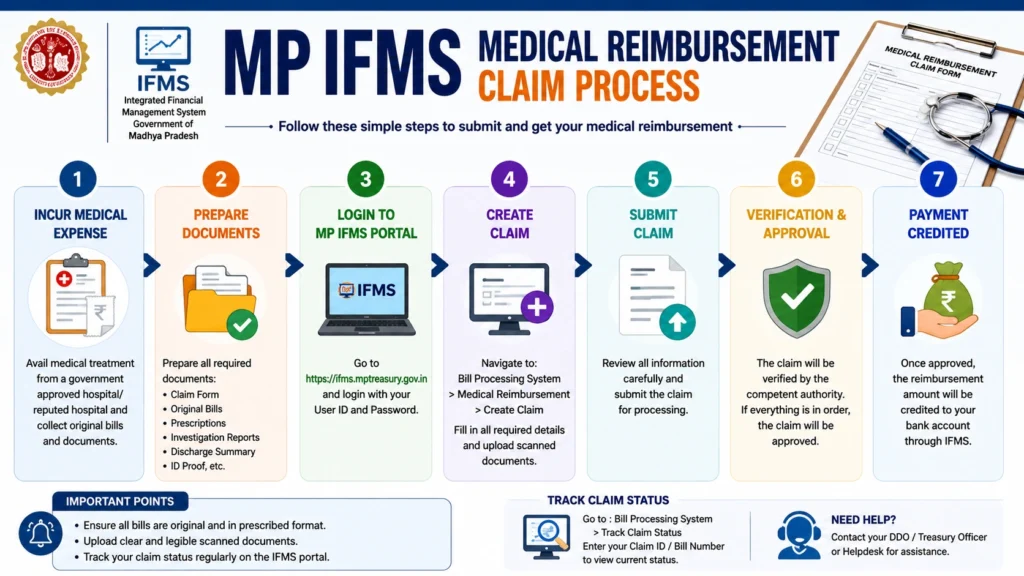
Medical Treatment
The employee receives treatment from a hospital or medical facility.
Collect Required Documents
Keep all necessary documents ready before applying.
Required documents may include:
- Medical bills
- Doctor prescription
- Hospital reports
- Test reports
- Discharge summary
- Payment receipts
Submit Claim Online
The employee enters claim details and uploads required documents through the IFMS portal.
Department Verification
The concerned department checks:
- Employee details
- Medical documents
- Claim amount
- Eligibility
Approval and Payment
After successful verification, the claim is approved and payment processing begins.
Common MP IFMS Medical Reimbursement Claim Errors and Solutions
Many employees face problems while submitting or tracking claims. Below are common errors and their solutions.
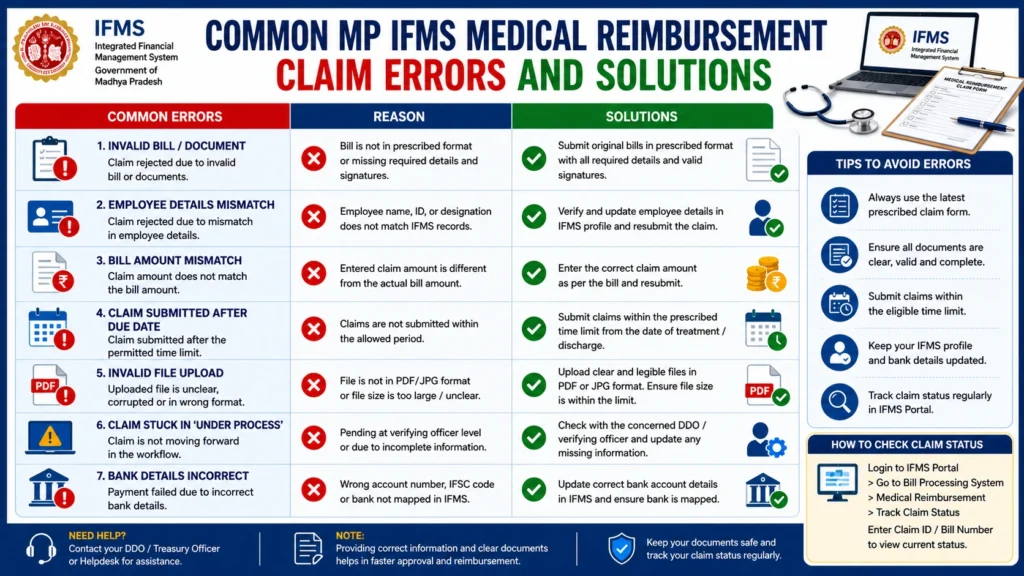
1. MP IFMS Medical Claim Status Not Showing
Possible Reasons:
Solution:
2. Claim Rejected Due to Missing Documents
Reason:
Important documents may not have been uploaded properly.
Solution:
Submit complete documents such as:
3. MP IFMS Login Problem
Reasons:
Solutions:
4. Claim Returned for Correction
Reason:
Information entered in the claim may be incorrect.
Common mistakes:
Solution:
Correct the details and resubmit the claim.
Documents Required for MP IFMS Medical Reimbursement Claim
Before submitting your claim, keep these documents ready:
How to Track MP IFMS Medical Reimbursement Claim Payment Status?
After approval, employees can track whether the reimbursement payment has been processed.
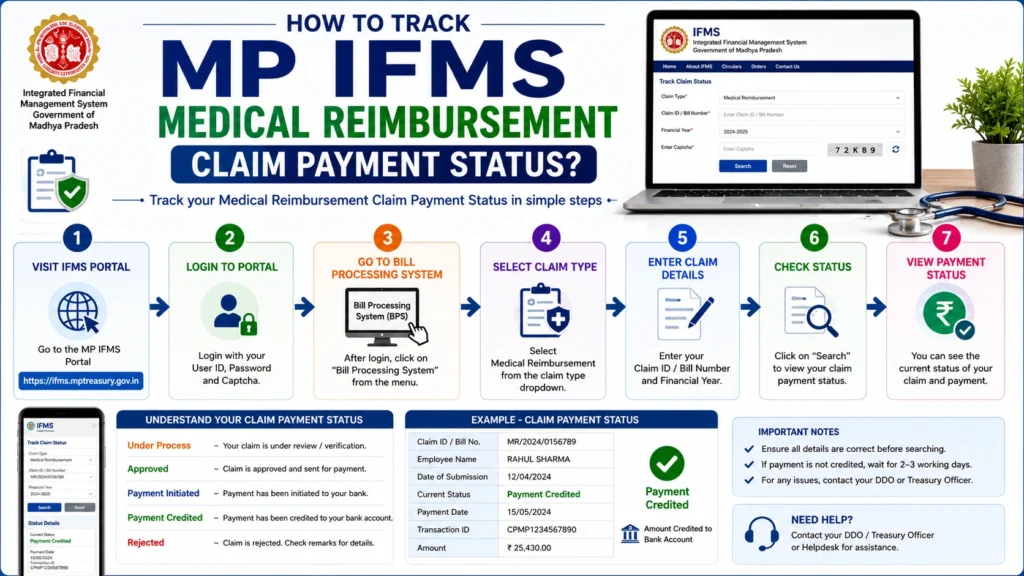
Follow these steps:
Payment status may show:
Reasons for Payment Delay
Payment may be delayed because of:
Tip: Always check that your bank details are updated correctly in your employee profile.
MP IFMS Medical Reimbursement Claim Eligibility Rules
Before applying, employees should confirm their eligibility.
Eligibility depends on:
Check These Things Before Applying:
Following proper guidelines can reduce claim rejection chances.
Difference Between MP IFMS Medical Claim Pending and Rejected Status
Many employees confuse pending and rejected claim status.
| Status | Meaning | Action Required |
|---|---|---|
| Pending | Claim is under review | Wait for approval |
| Returned | Correction needed | Update and resubmit |
| Rejected | Claim not approved | Check reason and take action |
A pending claim usually means the department is still checking documents.
How to Contact Support for MP IFMS Medical Reimbursement Issues?
If your problem is not solved through the portal, contact your department officer or IFMS support team.
Keep these details ready:
Providing complete information helps in faster resolution.
Tips to Avoid MP IFMS Medical Reimbursement Claim Rejection
Follow these simple tips:
Upload Clear Documents
Make sure every uploaded file is readable.
Check Details Before Submission
Verify:
- Name
- Employee number
- Medical expenses
- Bank details
Keep Original Documents Safe
Original documents may be required for verification.
Apply Within Time Limit
Late applications may create approval problems.
Track Your Claim Regularly
Regular checking helps you fix issues quickly.
Latest posts
- MP IFMS Medical Reimbursement Claim: Check Status, Process, Errors & Complete Guide
- MP IFMS NPS Contribution Missing: Check PRAN Credit Details?
- MP Treasury Challan Online: Pay, Status & Receipt Download
- How to Raise MP Treasury Salary Grievance on IFMS Portal
- Download IFMS Annual Salary Statement, Earnings Certificate
Frequently Asked Questions
Final Thoughts
The MP IFMS Medical Reimbursement Claim system makes it easier for Madhya Pradesh government employees to submit medical claims and track their progress online.
Employees should always submit complete documents, verify details carefully, and regularly check claim status to avoid delays.
If your claim shows pending, returned, or rejected status, understanding the reason and taking the correct action can help you complete the reimbursement process smoothly.