MP Treasury GPF Access Issue: Why You Can’t View Details Now
MP Treasury GPF Access Issue is a common problem employees face when trying to access their GPF (General Provident Fund) details through the MP Treasury portal. Accessing GPF information is essential for monitoring contributions, balances, and withdrawals, but many users experience difficulties logging in or retrieving their account data. These issues may occur due to technical glitches, incorrect login credentials, outdated employee records, or ongoing system maintenance on the treasury portal.
Understanding these reasons helps employees quickly resolve problems and maintain smooth access to their financial information. This guide explains why you may be unable to access your MP Treasury GPF details and the steps you can take to fix the issue efficiently.
What is MP Treasury (IFMS MP Treasury)?
MP Treasury is an online portal that allows government employees in Madhya Pradesh to access a variety of services, including GPF details, payslips, salary statements, and more. If you’re trying to check your GPF balance or transaction history, you’d typically log into the MP Treasury portal to do so.
Why Might You Not Be Able to Access Your GPF Details?
Even though you’ve logged in successfully, there can be several reasons why your GPF details are unavailable. Let’s look at some of the most common reasons:
1. Account Not Properly Linked
For your GPF details to show up, your employee account must be properly linked in the system. If your account isn’t linked correctly, you may see an error message or a blank GPF section.
2. Missing or Incorrect GPF Series or Account Number
The GPF system requires you to enter a valid GPF series and account number. If either is incorrect, you won’t be able to access your details. Make sure you have the correct GPF series code and account number.
3. Technical Issues – Browser, Cache, or Server Overload
Sometimes, server overload or technical glitches in the portal can prevent access to your GPF details. If the portal is experiencing high traffic, or if there’s an issue with your browser’s cache, you might face difficulties accessing the information.
4. Incorrect Login Credentials
Some portals require a combination of different credentials like your GPF series, account number, and possibly a password. If any of these are incorrect, you won’t be able to see your details.
5. GPF Account Not Initialized
If you’re a new employee or have recently been transferred, your GPF account might not yet be initialized in the system. In such cases, you can log in successfully but won’t see any GPF data.
6. Role Limitations
Certain user roles may have restricted access to specific information. If your role is limited or you don’t have the necessary permissions, GPF details might be hidden from your view.
Steps to Ensure Your GPF Account is Properly Set Up
If you’re facing issues accessing your GPF details, it’s possible that your account is not set up properly in the system. Here are the steps to ensure everything is in order:
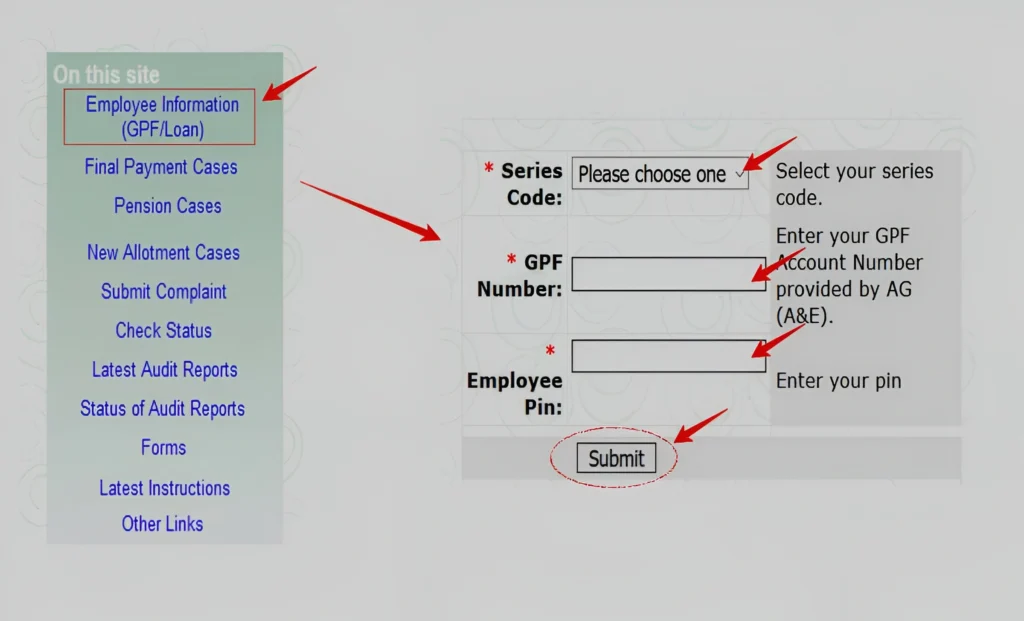
Ensure that both IDs are linked correctly in the system. If there’s any discrepancy, it could block your access to GPF details.
New employees or transferred staff might not have their records updated in the system. Contact your department’s HR or DDO to confirm this.
Sometimes, GPF account details might not be properly entered into the system. Verify the accuracy of your GPF account number, series, and other personal details.
How to Reset or Recover Your Login Credentials
In case you’ve forgotten your login credentials, here are a few steps you can take to reset or recover them:
Forgot Password:
If the portal offers a “Forgot Password” option, use it to reset your password. You may need to verify your identity through an OTP or email.
Incorrect GPF Series or Account Number:
If you suspect the issue lies with your GPF series or account number, contact your DDO or HR department to confirm the correct details.
Mobile Number or Email Verification:
Ensure that your registered mobile number and email address are updated in the system. These might be required for OTP verification or password recovery.
What You Can Do to Fix the Issue
Here are some simple steps to troubleshoot the problem:
FAQs
Final Thoughts
In conclusion, if you’re unable to access your GPF details, it’s likely due to common issues such as incorrect account information, browser-related problems, or technical glitches. By carefully reviewing your credentials and ensuring proper account linkage, most problems can be resolved.
If the issue persists, we recommend contacting your department’s DDO or the portal’s support team for further assistance. With the right guidance and support, you’ll be able to access your GPF details promptly.