MP Treasury IFMS Hidden Features Every Employee Should Know
The MP Treasury IFMS Hidden Features are often overlooked by employees, but they can significantly enhance your experience with the platform. Whether you’re managing your payslips, tracking financial transactions, or generating challans, these lesser-known features are designed to save time and improve efficiency.
Many government employees are aware of the basic functionalities of the MP Treasury IFMS, but there’s so much more to explore. In this article, we’ll walk you through these hidden gems, helping you make the most of the system for a smoother, more streamlined financial management experience.
What Is MP Treasury IFMS? A Quick Refresher
Before we dive into the MP Treasury IFMS hidden features, let’s quickly understand what IFMS really is.
IFMS stands for Integrated Financial Management System. It’s a web‑based application used by the state treasury of Madhya Pradesh to process and track financial transactions, manage employee salaries, challans, pension details, and much more. It centralizes all major financial operations into one secure digital platform.
Think of IFMS as a one‑stop financial dashboard for government employees and financial administrators. Instead of visiting different offices or filling out paper forms, you can do most tasks inside the system with a few clicks.
Secure and Easy Login – With OTP Verification
Many employees know about the basic login with user ID and password. But one feature not everyone uses effectively is the OTP (One Time Password) verification.
Instead of just logging in with a password, IFMS sends an OTP to your registered mobile number. This adds an extra layer of security and helps prevent unauthorized access.
Tip: Make sure your mobile number on the portal is always up to date. If you change numbers, update it immediately. This saves login problems and keeps your account secure.
Download Payslips in PDF Anytime
The ability to download payslips is one of the most useful IFMS features but many employees don’t know how flexible it can be.
Once you log in, you can choose any month or year and instantly download the payslip in PDF format. You don’t need to contact HR or visit the treasury office.
Pro tip: Save all your monthly payslips in one folder on your phone or cloud storage. This makes it easier to find them when applying for loans or preparing tax documents.
Challan Generation & E‑Payment Tracking
IFMS lets you generate challans online for tax payments, government fees, or other state dues. Once generated, you can also track the payment status using the challan number or transaction ID. This is much faster and more reliable than traditional offline challan tracking.
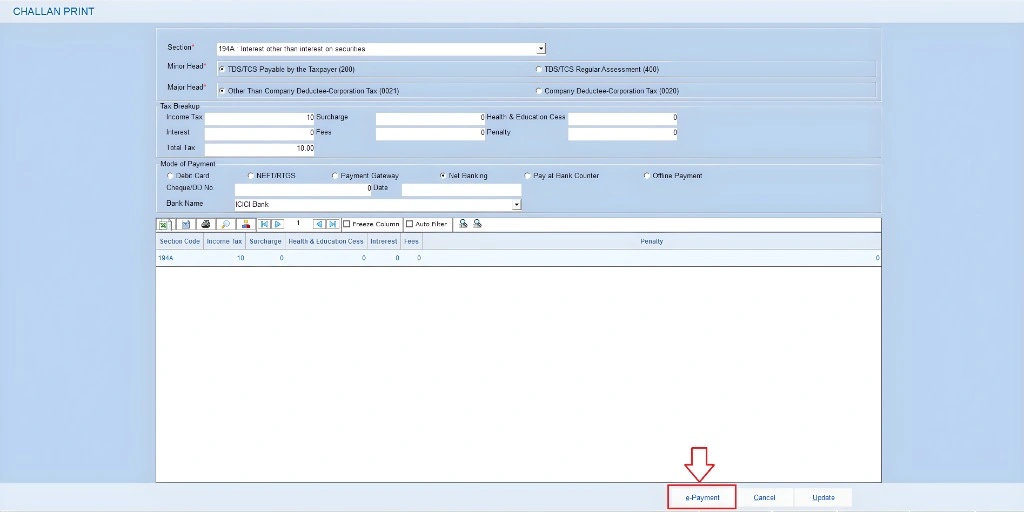
Step‑by‑step tip:
This helps avoid delays, penalties, or confusion about payment status.
Self‑Service Tools for Employees
IFMS has a section called Employee Self Service (ESS) that’s often underused. Here you can:
These features help you keep your profile updated without going to HR or treasury.
Tip: Review your ESS profile every few months to make sure all details (especially contact info) are correct.
Digital Pensioner Services
If you’re a pensioner or planning retirement soon, IFMS offers pensioner service options. This lets you view pension status, payment history, and related challans online.
You can also check updates on your pension schedule without visiting the treasury office. This makes retirement admin much easier.
Receipt and Report Tools
IFMS isn’t just for salaries it also provides tools to check receipt heads and reports. This means you can see financial receipts, budget records, and other financial reports in real time.
These features help employees, departments, and accounts teams stay transparent and informed about state finances.
Real‑Time Financial Status
One of the biggest advantages “hidden in plain sight” is the real‑time financial information that IFMS provides. Instead of waiting for monthly reports or treasury updates, IFMS shows current data for things like:
This helps departments and employees plan better and avoid delays.
Automated Security Features
IFMS uses secure login authentication, encrypted connections, and role‑based access. This means only authorized users can see specific data. Captcha verification also prevents spam or automated login attacks.
Security tip: Never share your password or OTP with anyone even if they claim to be support staff.
Budget Distribution Details
Budget data in IFMS is updated regularly. You can check how budget amounts are released, used, and still available for your department.
This helps accountants and DDOs make smarter financial decisions, prepare bills correctly, and avoid overspending.
MIS and Reports for Insights
IFMS includes MIS (Management Information System) dashboards and reports that provide quick insights. These dashboards help employees view data about:
This feature is especially valuable for accountants and senior officials who need quick data.
Built‑In Help and Support
The system includes feedback and grievance options so you can report problems or get help directly through the portal. There’s also treasury contact info available on the portal.
Bonus Tips Every IFMS User Should Know
Bookmark Login Page:
Save the official IFMS login page in your browser. This reduces login time and avoids fake websites.
Clear Cache Regularly:
Clearing your browser cache helps IFMS load faster and reduces login errors.
Keep Records Organized:
Save downloaded files (payslips, challans, reports) in folders by year or purpose. This saves time when you need them later.
Update Contact Info:
Always keep your email and mobile number up to date in IFMS to avoid login or OTP issues.
FAQs
Final Thoughts
The MP Treasury IFMS is more than just a payslip portal it’s a comprehensive financial platform packed with features that make administrative tasks easier for government employees. From digital payslips and online challans to self‑service tools and real‑time financial data, IFMS can save you time and reduce paperwork when you know how to use it properly.
Use the tips and features listed above to work faster, stay organized, and avoid common problems. Once you explore these hidden features, you’ll find IFMS becomes much more helpful day‑to‑day.