DDO vs Employee Login on MP Treasury IFMS: Key Differences
Understanding the distinction between DDO vs Employee Login on MP Treasury IFMS is crucial when navigating the platform. These two login types are designed to fulfill different roles within the government sector, each providing access to essential financial information but with varying functions and permissions. While both logins allow users to interact with financial data, they serve distinct purposes.
In this article, we’ll explore the key differences between DDO and Employee Login, their specific roles, and real-life use cases, helping you determine which login is right for your needs.
What Is MP Treasury IFMS?
IFMS is a secure online system for government financial tasks. It’s used by employees, accounts officers, and DDOs to manage accounts, pay slips, bills, funds, pensions, challans, and more through MP Treasury IFMS.
Main benefits:
Before jumping into the differences, here’s a quick picture of each login type.
Employee Login — Simple, Personal & Self Service
Who it’s for:
Government employees of MP.
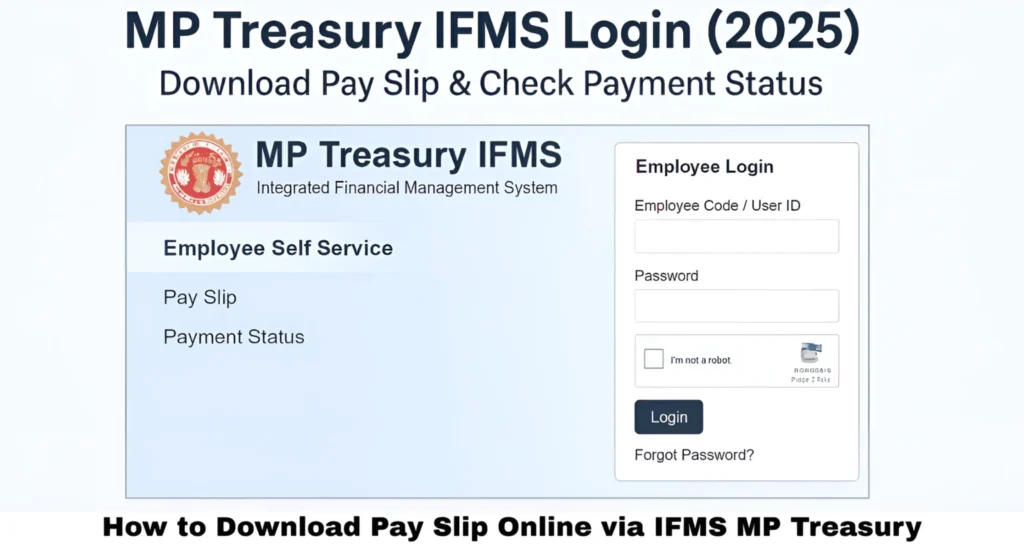
What you use it for:
How to login:
Once logged in, employees see their own work‑related data. The portal shows salary breakdowns, allowances, deductions, and other details.
Main reason to use it:
Employee login is about your own financial info only. You don’t process bills for other people or handle official funds — just your salary and related self‑service functions.
DDO Login — Official, Bill‑Focused & Financial Control
Who is a DDO?
DDO = Drawing & Disbursing Officer. This is an officer responsible for drawing funds from the treasury and disbursing them correctly. They handle financial operations and bills for an office or department.
What DDO does:
How DDO login differs from employee login:
Through their login, DDOs perform real financial tasks such as reviewing pay bills, checking staff accounts, and interfacing with treasury systems. This clearly highlights the role distinction explained in DDO vs Employee Login on MP Treasury IFMS, where DDOs act as the official bridge between employees and the treasury payment process.
Simple example:
If an employee just wants their pay slip, they use employee login.
If someone needs to generate a pay bill for 50 employees in an office, that’s DDO login territory.
Side‑by‑Side Comparison
| Feature / Task | Employee Login | DDO Login |
|---|---|---|
| Login Purpose | See your own data | Manage office financial tasks |
| Access Level | Personal info only | Official, broad access |
| Payslip Download | Yes | Yes |
| Bill Preparation | No | Yes |
| Salary Disbursement | No | Yes |
| Employee Database | View only | View + modify |
| Fund Drawing | No | Yes |
| Office Reports | No | Yes |
| Role in IFMS | Self‑service | Transaction processor |
Bottom line:
Employee login = You view your stuff.
DDO login = You manage and process payments for many others.
Real‑Life Roles & Use Cases
Here’s how these logins play out in real use:
- You want your salary slip PDF for tax filing.
- You want to check payment status for a benefit.
- You need to update your phone/email.
- You’re checking GPF or leave info.
- You’re preparing monthly pay bills for your department.
- You need to submit bills to treasury for payment.
- You manage staff financial records or approvals.
- You authorize employee salary changes or launch bills from the office.
Common Mistakes & How to Fix Them
I can’t login with my employee code:
Double‑check spelling and contact your DDO if first‑time credentials aren’t issued yet.
OTP not arriving:
Make sure your mobile number is up‑to‑date and you have signal.
DDO tasks not visible:
Your DDO login may be missing required permissions — speak to your admin officer.
Portal slow or not loading:
Try clearing the browser cache, or retry at a quieter time.
Quick Tips to Use IFMS Smoothly
FAQs
Final Thoughts
Both Employee Login and DDO Login are essential in MP Treasury IFMS, but they serve different purposes. Employee Login is designed for individual government employees to access their personal financial data, such as downloading pay slips and checking salary details. It’s a simple, self-service platform for personal use.
On the other hand, DDO Login provides a higher level of access for officers responsible for managing the financial operations of a department. DDOs handle official tasks like generating pay bills, submitting financial documents, and managing employee payment records. While both logins are crucial, understanding their distinct roles helps users choose the right one for their specific needs and tasks.