How to Update Aadhaar/Demographic Details in MP Treasury: A Simple Guide
Updating your Aadhaar or demographic details is crucial to ensure that your MP Treasury services run smoothly, including salary processing, pension services, and government portal authentication. If you’ve moved to a new address, changed your name, or updated your contact information, here’s a simple guide to update your details.
Why You Need to Update Aadhaar Information for MP Treasury?
Having accurate Aadhaar details is essential for online verification on platforms like MP Treasury, where government services like salary, pension, and other disbursements are processed. If your details aren’t updated, it can delay payments and verification processes.
Steps to Update Aadhaar/Demographic Details in MP Treasury
Here are two simple ways you can update your details:
1. Online Method: Update Aadhaar Details from Home
If you have your mobile number linked to your Aadhaar, you can easily update your details online. Follow these easy steps:
Steps:
Enter your 12-digit Aadhaar number and request an OTP to verify your identity.
You can update information like your name, address, date of birth, mobile number, and email.
Provide clear scanned copies of documents as proof for the details you want to update.
Double-check everything and submit the request. You’ll receive a URN (Update Request Number) to track your status.
Tip: Make sure your proof documents (address proof, identity proof) are clear and readable.
2. Offline Method: Visit an Aadhaar Enrolment Centre
If you’re unable to update your Aadhaar online or don’t have your mobile number linked, visit an Aadhaar Enrolment Centre to complete the process.
Steps:
Find a Nearby Centre
Use the official UIDAI website to locate your nearest Aadhaar update centre.
Bring Required Documents
Bring both original and photocopies of identity and address proof (e.g., passport, voter ID, electricity bill).
Fill Out the Update Form
The centre staff will guide you through the form and help you with the update.
Receive an Acknowledgement
You’ll be given a receipt with the URN to track your update.
Tip: Keep your URN safe for status tracking.
How to Check Your Aadhaar Update Status
Once you’ve submitted the update request (online or offline), it’s important to know when your update is processed. Here’s how you can check:
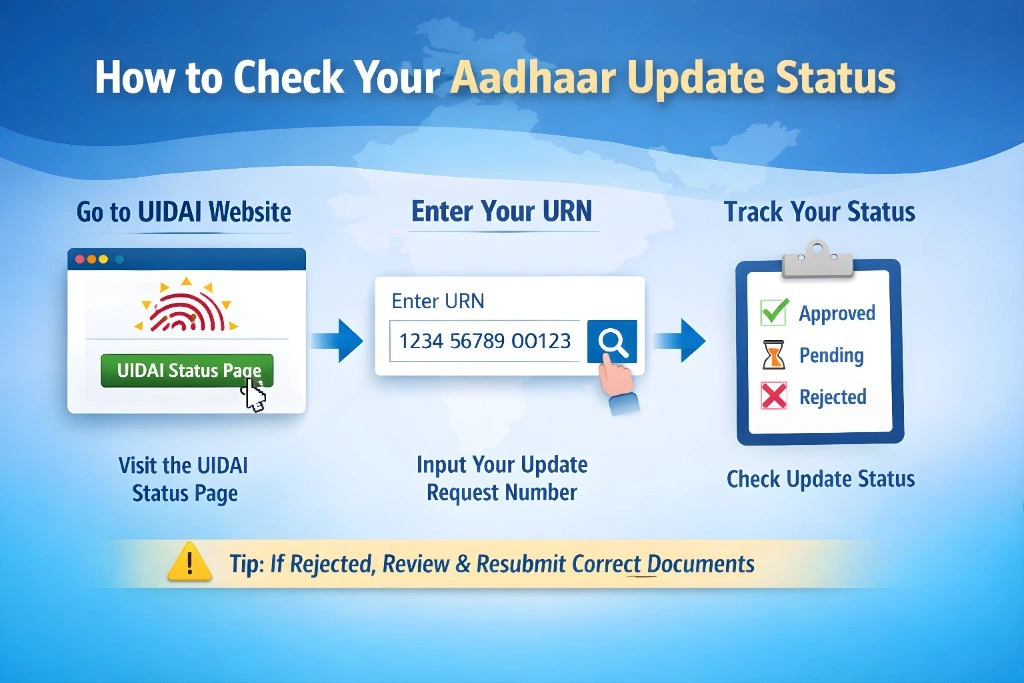
Visit the UIDAI Status Page to track your update status.
Input the URN you received during your update submission.
See whether your update is approved, pending, or rejected.
Tip: If your update gets rejected, ensure the documents are clear and legible, and re-submit them with corrections.
Common Documents Required for Aadhaar Update
Here are the common documents you’ll need to update your Aadhaar:
- Passport
- PAN Card
- Voter ID
- Ration Card
- Electricity Bill
- Bank Statement
- Rent Agreement
- Passport
Make sure all documents are self-attested.
How Updating Aadhaar Helps With MP Treasury
Updating your Aadhaar ensures a seamless connection with government portals like MP Treasury for smooth transaction processing. Whether it’s for salary, pension, or other services, having accurate Aadhaar information ensures that:
FAQs
Final Thoughts
Updating your Aadhaar details is an essential step for smooth government service access. Whether you’re using MP Treasury for salary or pension, or any other service, keeping your information accurate ensures timely payments and hassle-free experiences.
Stay on top of your Aadhaar updates today to make sure your MP Treasury services run smoothly tomorrow!