How to Report Technical Issues on MP Treasury IFMS Portal
Facing technical issues on the MP Treasury IFMS Portalcan interrupt important tasks such as payslip access, bill processing, or payment tracking. Whether you are experiencing login errors, page loading problems, or transaction failures, knowing the correct way to report the issue is essential.
In this guide, we explain how toreport technical issues on the MP Treasury IFMS Portal, including where to submit complaints, what details to provide, and how to ensure faster resolution from the support team.
What Is the MP Treasury IFMS Portal?
The Integrated Financial Management System (IFMS) is a digital platform used by the Madhya Pradesh Treasury to manage financial operations like employee payslips, challans, pension data, and more all in one online system. It’s part of the government’s move toward paperless, fast, and transparent financial services.
Whether you’re a government employee, DDO, accountant, or officer, you interact with IFMS for key tasks. But, like any online tool, it can have technical hiccups and knowing how to report them properly makes all the difference.
Technical Issues You Might Encounter
Before reporting a problem, it helps to know what counts as a technical issue or bug. Technical Issues on MP Treasury IFMS Portal are typically those problems that prevent the portal from working correctly or stop users from completing their tasks smoothly.
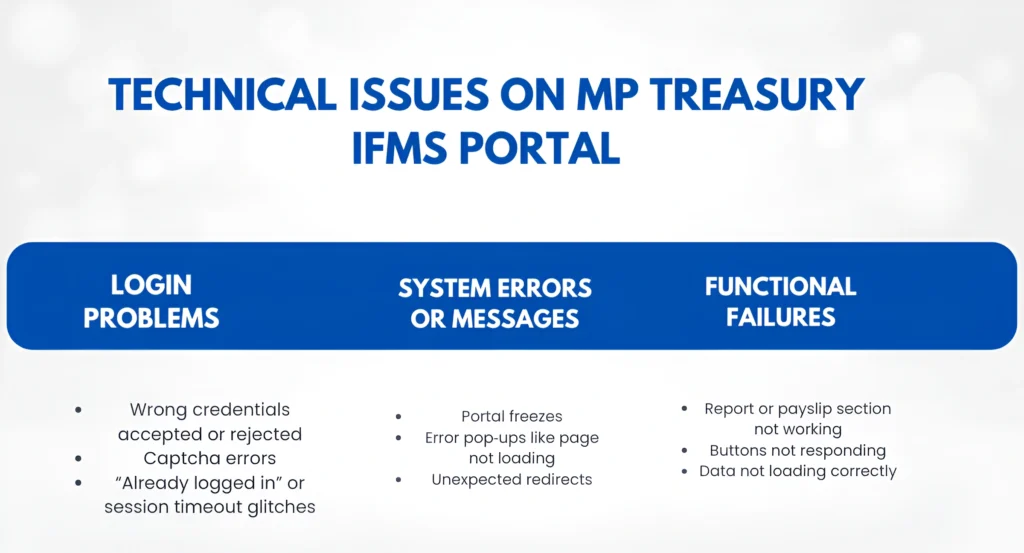
Login Problems
System Errors or Messages
Functional Failures
Performance Issues
Identifying exactly what is going wrong helps you describe the issue clearly when reporting it — which in turn helps support teams fix it faster.
Step‑by‑Step: How to Report an Issue on MP Treasury IFMS
Here’s a simple, friendly process you can follow when something goes wrong:
1. Note the Problem Clearly
Start by describing the issue in your own words — what you were trying to do and what happened instead.
Ask yourself:
For example:
“I tried to download my payslip, but after logging in the page keeps saying Error fetching data.”
Clear descriptions help support teams understand the issue without guessing.
2. Take a Screenshot (If You Can)
A picture is worth 1000 words!
Screenshots show exactly what you see on your screen and often make it much easier for support to pinpoint the bug.
On most devices:
Attach this when you submit your report.
3. Use Official Reporting Channels
There are a few official ways you can report issues:
Helpdesk Number:
Call the IFMS support line if you want a quick response — especially for urgent problems.
Helpdesk: 18004198244
Office Phone: 07552676021 / 07552676044
This is often the fastest way to get someone to look into a problem live.
Email Support:
If the issue isn’t urgent or you want to attach screenshots and details, email is great.
Support Email: dta_director@mptreasury.gov.in
Write a simple email:
Example:
Hello,
I tried to generate my payslip on the IFMS portal today (23‑Dec‑2025). After logging in, I get an Error fetching data message. I have attached a screenshot. Please help.
— Your Name / Employee Code / Contact
This gives support the context they need to investigate.
If Available: Helpdesk Portal
Some systems have an online support ticket or helpdesk interface where you can submit issues directly on the web. If MP Treasury IFMS provides one (check the official site or dashboard), use it because it organizes issues and tracks responses.
4. Follow Up Politely if Needed
If you don’t hear back in a couple of days, it’s okay to follow up either by email or phone. Keep it polite, and include your original message so they can pick up where they left off.
Example:
Hello, I wanted to follow up on my issue submitted on [date]. The problem still persists. Any updates?
Support staff are often busy, so a gentle reminder can help.
Tips to Speed Up Bug Fixes
Here are quick tips that users love because they get faster help:
By doing these things, you make it easier for support teams to analyze and fix the problem — and you get back to work sooner!
What to Do While Waiting for a Fix
Sometimes issues can take time to resolve — especially if it’s a server‑side bug. Here’s what you can do:
FAQs
Final Thoughts
Reporting technical issues on the MP Treasury IFMS Portal doesn’t have to be frustrating. By explaining clearly, using the right contact methods, and giving helpful details, you get faster support and you help the system improve for everyone.
Remember:
Describe the problem clearly
Use screenshots
Contact helpdesk or email
Follow up if needed