MP Treasury Salary Bill Process: From Bill to Bank Credit
The MP Treasury Salary Bill Process is an essential part of how government employees in Madhya Pradesh receive their monthly salaries. This system ensures that the salary bill, once generated, is processed efficiently and reaches the bank accounts of employees on time. Understanding the step-by-step journey from bill creation to the final bank credit helps employees stay informed and aware of the entire process, ensuring there are no delays or errors along the way.
In this article, we’ll break down each stage of the MP Treasury Salary Bill Process to help you better understand how your salary reaches your bank account smoothly and without hassle.

What is MP Treasury IFMS?
MP Treasury IFMS stands for Integrated Financial Management System. It’s an online government platform used by the Madhya Pradesh Finance Department to manage financial activities including salary bills, salary slip generation, payment processing, and bank credit for state employees.
Think of it as a digital “hub” that connects all financial jobs in one place instead of paperwork and manual approvals.
Why IFMS Matters for Salaries
Before MP Treasury IFMS, salary processing could be slow, paper‑based, and error‑prone. With IFMS, everything — from salary preparation to approval and bank credit — happens online. This makes it:
All you need is your employee login and bank details updated in the system.
Step‑by‑Step MP Treasury Salary Bill Process: Bill to Bank Credit
Here’s how your salary travels from a bill in the system to being credited in your bank account:
Every month, your department/office prepares a salary bill. This includes:
- Your employee details
- Basic pay
- Allowances (like DA, HRA)
- Deductions (like PF, tax)
- Net salary amount
This salary bill is prepared digitally in the IFMS, so it enters the system automatically.
Once the bill is ready:
- The DDO (Drawing & Disbursing Officer) reviews it.
- All details must be correct — including your bank account and IFSC.
- If something is wrong, the bill may be rejected or sent back for correction.
This step is crucial because any error can delay the payment.
After DDO approval:
- The verified salary bill is forwarded to the treasury office through IFMS.
- Here it gets a system token and enters the treasury’s payment queue.
This is where MP Treasury begins its official processing.
At the treasury:
- Officials check whether funds are available.
- They verify if the bill matches financial rules.
- If approved, the bill moves to the e‑payment stage.
This is a key quality check before money goes to the banks.
Once approved:
- IFMS generates an electronic payment instruction.
- The system prepares a payment file that contains salary credit details for every employee — including bank account number, IFSC, and salary amount.
This file is securely sent to the Banking Network that is linked with the treasury, often through the government’s e‑payment interface.
After the file reaches the bank:
- The bank reviews and validates the salary data.
- Bank credits salaries to individual accounts.
- This usually takes 24–48 hours after processing.
Once credited, the status in the system changes from “Sent to Bank” to “Credited.” Some systems even show exact dates and time!
How to Check Your Salary Status
You don’t need to wait and wonder. Here’s how you can check:
This gives real‑time status so you know exactly where your payment stands.
Common Things That Can Delay Salary
Even though the process is smooth, delays can happen due to:
Tip: Always check your details in the system before the billing cycle!
How to Download Your Salary Slip
Your salary slip shows the detailed breakdown of your pay. To get it:
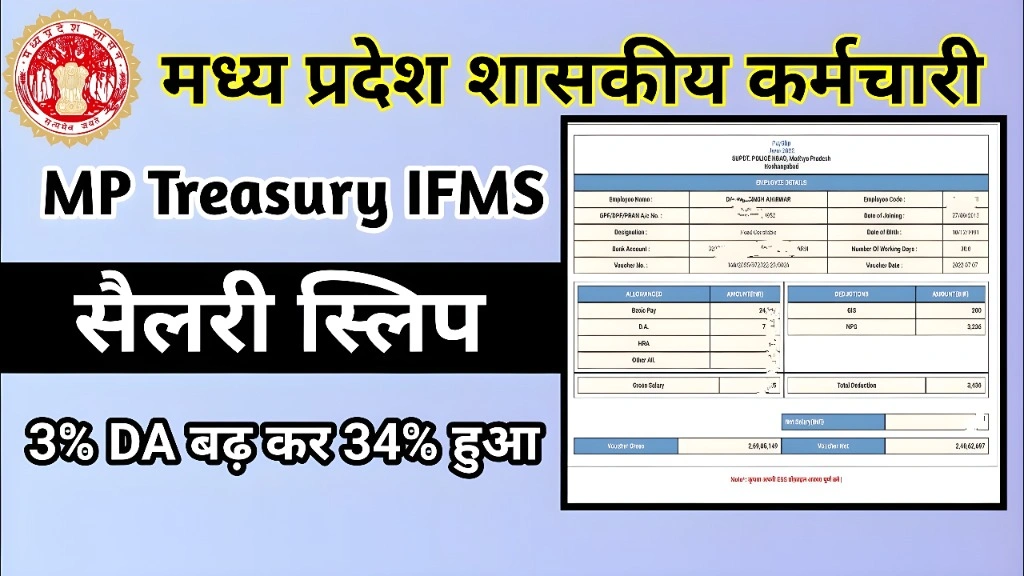
Your salary slip will include basic pay, allowances, deductions, and net salary — all in a pdf format you can save or print.
Quick Tips for a Smooth Salary Process
Here are some simple tips to prevent common salary issues:
Keep Your Bank Details Updated
Double‑check your bank account and IFSC before salary processing begins.
Update Contact Info
Ensure your correct mobile number and email are in the IFMS portal to receive alerts.
Fix Errors Early
If you see wrong entries in your salary slip or portal profile, contact the DDO before payroll month ends.
Check Status Regularly
Use the status tool to see if your salary is already approved or still in process.
Clear Pending Leaves
Sometimes leave or attendance mismatches may delay salary approval.
FAQs
Final Thoughts
The MP Treasury IFMS salary process is designed to ensure that your salary goes from a bill to your bank account securely and quickly. It replaces old manual methods and gives you a transparent way to check salary progress and download payslips online.
By understanding each step from bill creation to bank credit you can stay in control and avoid common delays.