How MP Treasury IFMS Treasury Voucher System Works Explained
The MP Treasury IFMS Voucher System is an advanced digital platform implemented by the Madhya Pradesh government to streamline the management of salaries, bills, and official transactions with full transparency and efficiency. Departments use this system to create treasury vouchers, which serve as official documentation for every government payment. The Integrated Financial Management System (IFMS) ensures real-time tracking of financial transactions, minimizing errors, delays, and potential corruption.
In this guide, we’ll walk you through the step-by-step process of how the MP Treasury voucher system functions, how payments are processed, and how beneficiaries can easily monitor their payment status.
What Is the MP Treasury IFMS System?
MP Treasury IFMS stands for Madhya Pradesh Treasury Integrated Financial Management System. It’s an online financial platform created by the Madhya Pradesh Government to manage its money flows especially vouchers, payments, salaries, challans, and accounting — in a digital and transparent way.
Simply put:
The core goal is accuracy, transparency, and traceability of government financial activities.
Why This System Is Important
Before IFMS, treasury work was mostly manual:
That meant:
With IFMS: everything is digital, logged, searchable, and audit‑ready which improves speed, reduces mistakes, and makes life easier for both officials and citizens.
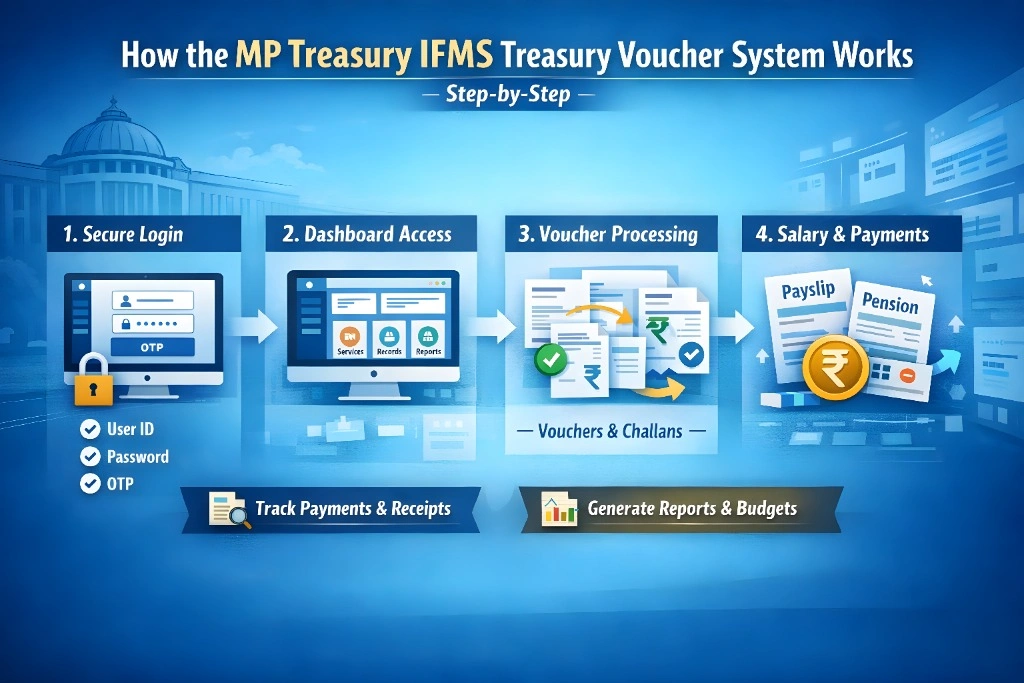
How the MP Treasury IFMS Treasury Voucher System Works (Step-by-Step)
Here’s the simple picture of how it functions:
User Logs Into the IFMS Portal
You (employee, pensioner, DDO, or accountant) first go to the official MP Treasury IFMS website and log in with your credentials.
You use:
This secure login protects your data and access.
Dashboard & Services Are Displayed
Once logged in, you’ll see options like:
This central dashboard shows everything you need based on your role (employee vs. accountant vs. pensioner).
Voucher Entry & Processing
Treasury vouchers are digital documents that:
Every transaction that affects treasury funds like salary payouts, vendor payments, or tax receipts gets logged here in structured format.
Implementation includes:
This ensures every financial activity has a digital trail that can’t be lost.
Challan Generation & Tracking
A challan is a payment or tax slip used to pay government dues.
In IFMS you can:
This is super helpful when paying:
It replaces old physical challans and ensures payment status shows up quickly in the system.
Salary, Pension & Payslip Handling
One of the most used parts of IFMS is employee and pensioner services:
You no longer need to visit the treasury physically to get these basic records.
Reports & Budget Tracking
IFMS supports advanced reporting, including:
These reports help:
What Makes the System Efficient
The IFMS treasury voucher module helps in several useful ways:
Every voucher is saved online no risk of losing vouchers under piles of paper.
No hidden slips or back‑dated entries everything is timestamped and logged.
You and other stakeholders can see payment status, challan processing, and voucher history any time.
Government auditors love this because IFMS stores everything they need for auditing and compliance.
Quick Tips for Users (So You Don’t Screw It Up)
Whether you’re logging in to check a payslip or entering a voucher, follow these tips:
Save Your Login Info Securely
Don’t lose your ID/password or share it.
Download Proofs
After generating challans or vouchers, download PDF and save.
Check Status Daily If You’re Processing Payments
Delays cause cascading issues.
Use the Helpdesk When Needed
Government IFMS support can guide you if stuck.
FAQs
Final Thoughts
Understanding and using the MP Treasury IFMS Treasury Voucher System is crucial for anyone working with government finances in Madhya Pradesh. It offers a streamlined, secure, and efficient way to handle treasury tasks, from voucher entries to salary tracking.
Whether you’re a government employee, pensioner, or part of the finance team, mastering the platform will help you save time, reduce errors, and ensure transparency. By following the easy steps outlined here and using the tips provided, you can navigate the system with confidence.